VST Spectrum Analyzer For Professional DAW Workflow

Integrate professional real-time spectrum analysis directly into your DAW. VST3 plugin format for seamless workflow, built-in WASAPI loopback, and optimized performance for mixing and mastering in Windows.

VST Spectrum Analyzer Plugin Interface

What is a VST Spectrum Analyzer?

🎛️

DAW Integration

A VST spectrum analyzer is a plugin that runs inside your DAW (Digital Audio Workstation), providing real-time FFT frequency analysis of your audio. Insert it on any track, bus, or master channel to visualize frequency content while you mix.

Real-Time FFT Analysis

Using Fast Fourier Transform (FFT) algorithms, VST analyzers convert audio signals into frequency domain displays instantly. See exactly what frequencies are present in your mix as you work, enabling data-driven mixing decisions.

🔧

Professional Workflow

VST format allows spectrum analyzers to integrate seamlessly into your production workflow. No external software needed - analyze audio directly within FL Studio, Ableton, Cubase, Pro Tools, Reaper, or any VST3-compatible DAW.

Why Use a VST Spectrum Analyzer in Your DAW?

Mixing Benefits

  • Identify frequency masking between instruments
  • Find and eliminate resonances and harsh peaks
  • Balance low-end without muddiness
  • Compare your mix to reference tracks
  • Make informed EQ decisions with visual feedback
  • Spot problematic frequencies instantly

Mastering Applications

  • Ensure balanced frequency response across spectrum
  • Match commercial reference track balance
  • Identify subtle tonal imbalances
  • Verify mastering chain processing results
  • Check for unwanted sub-bass energy
  • Analyze high-frequency extension

Production Workflow

  • Insert on master bus for continuous monitoring
  • A/B compare different mix versions
  • Verify plugin processing effectiveness
  • Troubleshoot audio issues quickly
  • Learn how different instruments occupy spectrum
  • Develop better frequency awareness

VST3 Format Advantages

VST3 is the modern plugin standard developed by Steinberg. It offers significant improvements over older VST2 format, making it ideal for real-time spectrum analysis in professional DAW environments.

Optimized Performance

Efficient CPU Usage: VST3 plugins only process audio when receiving signals, reducing CPU load when tracks are muted or silent.

Real-Time Priority: Optimized for low-latency real-time processing, essential for continuous spectrum monitoring during mixing sessions.

Sample-Accurate Automation: Precise parameter control for analyzer settings like FFT size and windowing functions.

Broad DAW Compatibility

Industry Standard: Supported by all modern DAWs including Cubase, FL Studio, Studio One, Bitwig, Reaper, and more.

Windows Integration: Native 64-bit Windows support with seamless integration into your DAW's plugin management.

Future-Proof: VST3 is actively maintained and will be supported for years to come, unlike legacy formats.

Advanced Features

Multi-Channel Support: Analyze stereo, mono, or multi-channel audio with proper routing.

Sidechain Capability: Compare multiple tracks or buses simultaneously when supported.

Plug-and-Play: Automatic plugin scanning and categorization in your DAW for easy access.

Using VST Analyzers in Popular DAWs

FL Studio

  • Add to mixer insert slot for per-channel analysis
  • Insert on master channel for final mix monitoring
  • Use on send buses to analyze reverb/delay tails
  • Compare multiple instances across different channels
  • F9 to open mixer, right-click slot, select analyzer

Ableton Live

  • Drag analyzer into audio effect rack on any track
  • Insert on master for overall mix analysis
  • Use in return tracks for effect analysis
  • Group multiple analyzers in effect racks
  • Compatible with Live 10+ VST3 support

Cubase / Studio One

  • Native VST3 support with full integration
  • Insert on channel strips or master bus
  • Use in control room for monitoring
  • Assign to custom workspace layouts
  • Save analyzer presets for quick recall

Pro Tools

  • AAX format wrapped VST3 for compatibility
  • Insert on tracks, aux, or master fader
  • Use during tracking for frequency monitoring
  • Essential for mixing and mastering sessions
  • Compare with built-in EQ3 spectrum display

Reaper

  • Excellent VST3 support with flexible routing
  • Insert on FX chain at any position
  • Use JS ReaEQ alongside for visual EQ matching
  • Create custom track templates with analyzer
  • Lightweight for multiple instances

Bitwig Studio

  • Modern VST3 implementation
  • Insert in FX chains or as standalone device
  • Use with Bitwig's modulation system
  • Integrate into custom device chains
  • Full plugin sandboxing for stability

Professional VST Analyzer Techniques

1. Master Bus Monitoring

Setup: Insert analyzer as the last plugin on your master channel.

Purpose: Continuously monitor your entire mix's frequency balance as you work. Catch problems before they accumulate.

Workflow: Keep analyzer visible in second monitor or floating window. Glance at it while mixing to ensure balanced spectrum.

Pro Tip: Use peak hold mode to capture transients and temporary frequency spikes during dynamic sections.

2. Reference Track Comparison

Method: Import reference track into your DAW. Route it and your mix through separate analyzer instances.

Analysis: Compare frequency balance, low-end energy, high-frequency extension, and midrange density between tracks.

Critical Rule: Match similar song sections (verse to verse, chorus to chorus). Don't compare static snapshots.

Action: Make subtle EQ adjustments to bring your mix's balance closer to the reference without exact copying.

3. Frequency Conflict Resolution

Problem Detection: When two instruments sound muddy together, load analyzer on each track's channel.

Visual Analysis: Solo each track and note where their dominant frequencies overlap (usually 200-500 Hz for muddiness).

Solution: Use subtractive EQ - cut the less important element at the conflicting frequency, boost the more important one if needed.

Result: Each element occupies its own sonic space with clear separation and definition.

4. EQ Decision Verification

Before/After: Insert analyzer before and after EQ plugin to visualize exactly what your EQ is doing.

Learning Tool: Train your ears by making EQ changes with eyes closed, then verify with analyzer. Develop better frequency recognition.

Precision: Confirm you're cutting/boosting the intended frequencies. Catch mistakes like boosting wrong harmonic.

Mastering: Essential for subtle mastering EQ moves where changes are harder to hear but visible on spectrum.

5. Low-End Management

Bass Analysis: Insert analyzer on bass and kick drum channels to see where each instrument's fundamental frequency lives.

Conflict Resolution: If both peak at same frequency (e.g., 80 Hz), notch one and boost the other to create space.

Sub-Bass Check: Verify nothing below 30 Hz except intentional sub-bass. High-pass unnecessary low-end rumble.

Translation: Well-managed low-end on analyzer translates to tight, punchy bass on all playback systems.

6. Harshness & Sibilance Detection

Problem Frequencies: Use analyzer to identify harsh peaks in 2-8 kHz range that cause listener fatigue.

Vocal Sibilance: Insert on vocal channel, watch for excessive energy at 5-8 kHz during "S" sounds.

Treatment: Use de-esser targeting the specific frequency shown on analyzer, or manual EQ cut with narrow Q.

Verification: Re-analyze after processing to confirm harsh frequencies are tamed without losing presence.
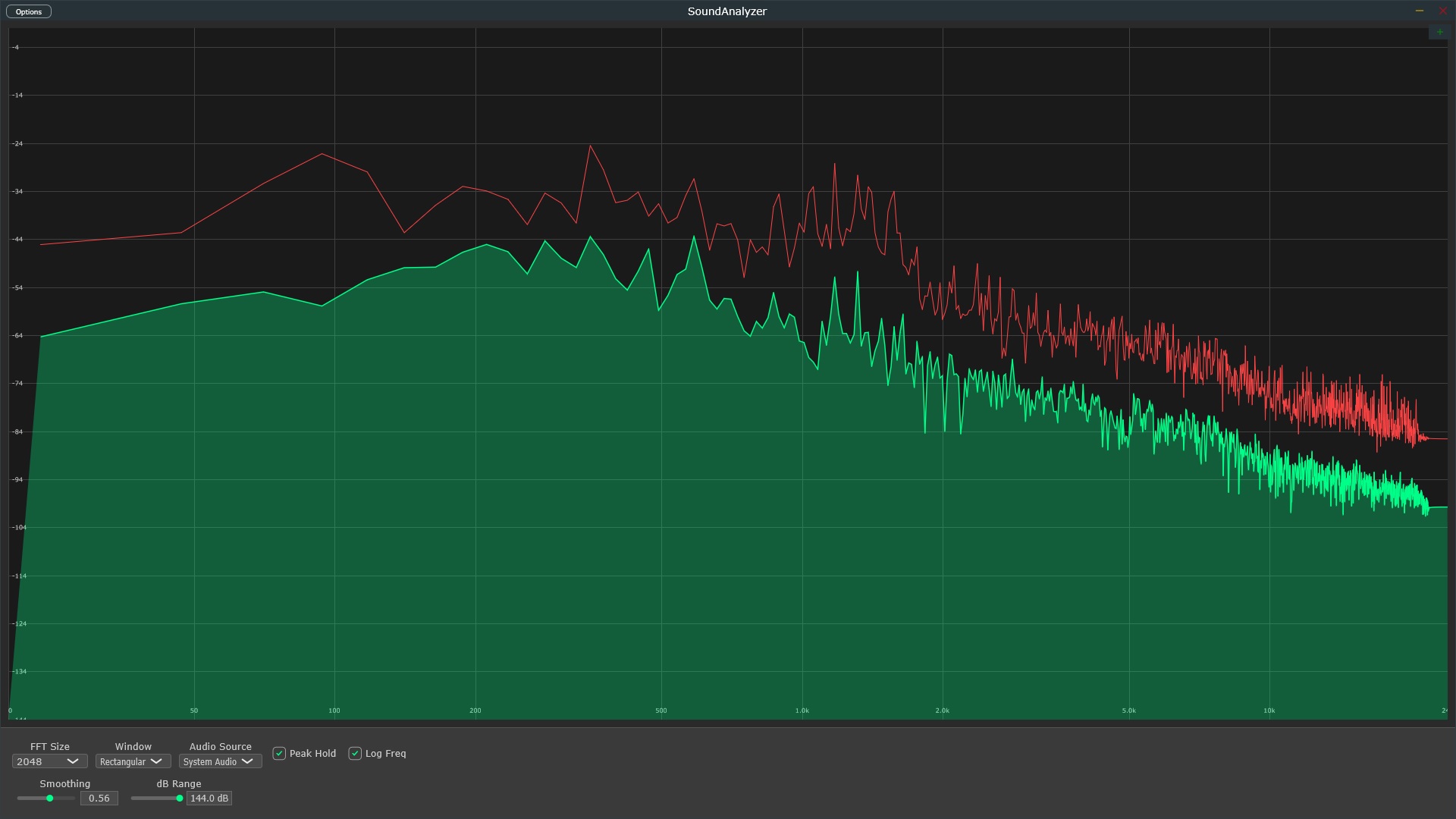
SoundAnalyzer VST3 Spectrum Analyzer

Professional VST3 spectrum analyzer plugin with unique built-in WASAPI loopback capability. Analyze both your DAW output and system audio without routing complexity.

SoundAnalyzer VST3 + Standalone

$5 Launch Price

Limited time offer - Regular price $59

  • VST3 plugin for all major Windows DAWs
  • Built-in WASAPI loopback (unique feature)
  • Real-time FFT analysis (1024-16384 points)
  • Standalone application included
  • Professional peak hold and smoothing
  • Configurable windowing functions
  • Linear and logarithmic frequency scales
  • Low CPU usage - multiple instances possible
  • Windows 10/11 64-bit optimized
Get SoundAnalyzer VST3

30-Day Money Back Guarantee