Standalone Spectrum Analyzer
Independent audio analysis software that runs outside your DAW. Analyze streaming music, system audio, reference tracks, and external sources with professional FFT spectrum analysis and built-in WASAPI loopback.
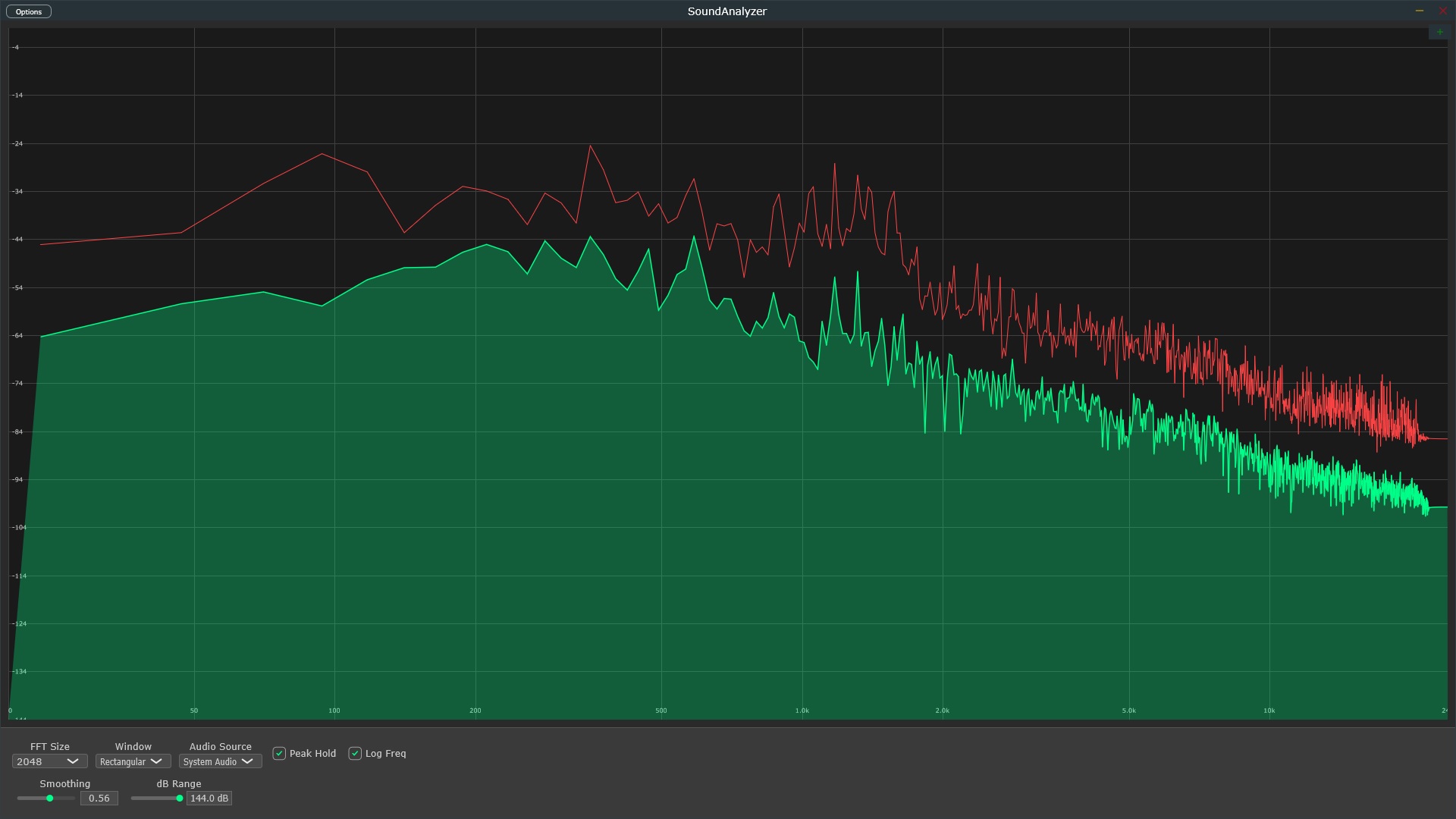
Independent audio analysis software that runs outside your DAW. Analyze streaming music, system audio, reference tracks, and external sources with professional FFT spectrum analysis and built-in WASAPI loopback.
A standalone spectrum analyzer runs as an independent Windows application, separate from any DAW or audio editing software. Launch it anytime to analyze audio without opening FL Studio, Ableton, or other production tools.
Monitor any audio playing on your computer - Spotify, YouTube, streaming services, games, video calls, or web browsers. Standalone analyzers with WASAPI loopback capture system audio directly without routing complexity.
Run continuously in the background without the overhead of a full DAW. Perfect for quick reference track analysis, audio troubleshooting, or learning frequency content while listening to music casually.
Scenario: You want to study commercial tracks while browsing streaming services without opening your DAW.
Solution: Launch standalone analyzer, play Spotify/YouTube, and instantly see frequency balance of professional mixes.
Learning: Study how different genres handle low-end, midrange density, and high-frequency extension while casually listening.
Efficiency: No need to download tracks, import to DAW, or set up routing - just play and analyze.
Use Case: Compare audio quality across different streaming platforms (Spotify vs Apple Music vs YouTube).
Method: Play the same song on different services and compare frequency response, especially high-frequency rolloff.
Insight: See how different compression algorithms and bitrates affect spectral content.
Education: Understand why lossless formats preserve more high-frequency information.
Problem: Unexpected audio issues - buzzing, hum, or frequency problems in system output.
Diagnostic: Standalone analyzer with WASAPI loopback captures system audio to identify problem frequencies.
Examples: 60 Hz hum from ground loops, USB noise, audio interface issues, or driver problems.
Quick Fix: Identify exact problem frequency, then apply targeted EQ or fix hardware issue.
Workflow: Export mix bounce, want to analyze without re-opening DAW project.
Speed: Drag audio file to media player, run standalone analyzer, check frequency balance instantly.
Comparison: Play multiple export versions side-by-side to compare mastering chain results.
Convenience: Lightweight alternative to loading entire DAW session for quick checks.
Learning: Train your ears by analyzing music you listen to normally.
Genre Study: Keep analyzer running while exploring different genres to understand their spectral characteristics.
Instrument Recognition: Identify where different instruments sit in frequency spectrum during casual listening.
Skill Development: Develop better frequency awareness through continuous exposure and analysis.
Applications: Monitor live streams, video conferences, broadcasts, or recorded events.
Quality Control: Ensure consistent audio quality during streaming sessions.
Professional Use: Verify broadcast audio meets frequency requirements without dedicated hardware.
Accessibility: Software solution more affordable than dedicated hardware spectrum analyzers.
Process:
1. Create folder of commercial reference tracks in your genre
2. Launch standalone analyzer, play each track
3. Screenshot spectrum of key sections (verse, chorus, breakdown)
4. Build visual reference library of professional frequency balance
Benefit: Visual database to reference during mixing without re-analyzing.
Setup:
1. Export multiple mix versions (different mastering chains, EQ settings)
2. Use media player to queue all versions
3. Keep standalone analyzer visible with peak hold enabled
4. Switch between versions, compare spectral differences
Decision: Choose version with best overall balance based on visual and auditory comparison.
Use Case:
1. Convert audio between formats (WAV to MP3, FLAC to AAC)
2. Analyze original with standalone analyzer, note frequency response
3. Analyze converted file, compare high-frequency preservation
4. Verify lossy compression doesn't excessively degrade quality
Insight: Understand impact of different codecs and bitrates on spectral content.
Many audio professionals express frustration trying to analyze system audio with plugin-only tools. Here's why standalone solutions matter.
Professional spectrum analyzer available as both standalone application and VST3 plugin. Built-in WASAPI loopback for system-wide monitoring. Single purchase includes both formats.
Limited time offer - Regular price $59
30-Day Money Back Guarantee